Aug 02, 2026
May 19, 2026
When I first started my blog, I thought I could just post any random photo and see results. I quickly learned that picking the right pinterest pin sizes is the difference between a viral hit and a total ghost town. There is nothing more frustrating than spending three hours writing a blog post, only to have the Pin look grainy or get cut off in the feed.
I have spent years testing different dimensions, from "giraffe pins" that were way too tall to tiny square images that got ignored. Today, I am going to share exactly what works for me and my clients so you can stop guessing. If you want more clicks, better engagement, and a professional-looking profile, you have to get your dimensions right.
Pinterest is a visual-first platform, but it is also a very structured one. The algorithm is designed to favor images that look good on mobile devices. Since over 80% of users are scrolling on their phones, your content needs to fit that vertical screen perfectly. If your Pin is the wrong size, Pinterest might not show it to as many people because it creates a poor user experience.
Using the recommended pinterest pin sizes also ensures that your text overlays remain readable. I have seen so many creators put their "hook" at the very bottom of a Pin, only for it to be covered by the Pinterest UI icons. When you use the right aspect ratio, you have full control over what the user sees.
Think about how you use the app. You scroll fast. Your brain decides in less than a second whether to stop or keep going. High-quality, correctly sized Pins create a sense of trust. If a Pin is blurry or awkward, the user subconsciously thinks the content behind the link might be low-quality too.
For most bloggers and affiliate marketers, the standard static Pin is your bread and butter. This is the classic vertical image that drives the majority of outbound clicks to websites. If you are just starting out, this is where you should spend 90% of your time.
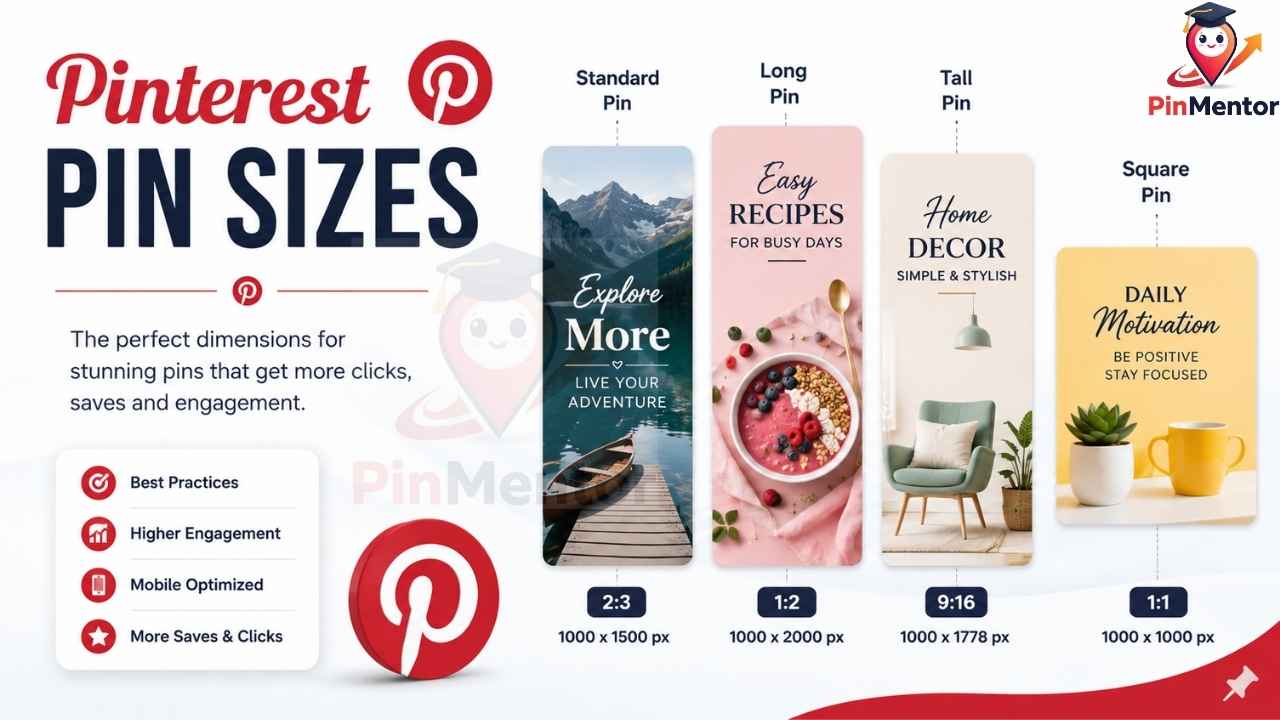
The official recommendation for pinterest pin sizes has remained consistent for a reason: the 2:3 aspect ratio simply works. This means for every 2 units of width, you have 3 units of height. The most common resolution for this is 1000 x 1500 pixels.
I personally use 1000 x 1500 pixels because it is high enough resolution to look crisp on Retina displays but not so large that the file size slows down your site. If you go much smaller, like 600 x 900, your text might look a little fuzzy when people zoom in.
A few years ago, everyone was obsessed with "infographic" style Pins that were incredibly tall. While they look cool, Pinterest now tends to truncate these in the feed. This means the bottom of your Pin gets cut off until someone clicks on it. It is much better to stick to the standard height to ensure your entire message is visible at first glance.
Pin Type | Recommended Dimensions | Aspect Ratio | Best Use Case |
Standard Pin | 1000 x 1500 px | 2:3 | Blog posts, Products |
Square Pin | 1000 x 1000 px | 1:1 | Product catalogs (Not ideal for ads) |
Long Pin | 1000 x 2100 px | 1:2.1 | Infographics (Use sparingly) |
Video is no longer "optional" on Pinterest. It is a massive driver of engagement. However, video pinterest pin sizes are a bit more flexible, though sticking to vertical is still the winning strategy. I’ve found that video is the best way to show a "how-to" or a "before and after" that static images just can't capture.
You should aim for either 2:3 or 9:16 aspect ratios for video. If you are repurposing content from TikTok or Instagram Reels, the 9:16 ratio (1080 x 1920 pixels) works perfectly well on Pinterest. It fills the entire screen and feels very immersive.
One mistake I see often is people uploading horizontal videos (16:9). These look tiny in the feed and have huge black bars above and below them. It’s a waste of space. If you have a horizontal video, try to crop it or place it inside a vertical template with some text above it.
File Type: .mp4 or .mov are best.
Max File Size: 2GB, but smaller is better for faster loading.
Duration: 4 seconds to 15 minutes. (Though 15–30 seconds is the sweet spot for clicks).
Idea Pins have evolved quite a bit. Originally, they were like stories that didn't disappear. Now, they are more integrated into the main feed. Because Idea Pins often feature multiple "pages," getting the pinterest pin sizes right for every page is crucial for a smooth transition.
For Idea Pins, you absolutely want to use the 9:16 aspect ratio (1080 x 1920 pixels). Since these are designed to be "tapped" through, any other size will result in ugly borders. I like to think of Idea Pins as a mini-presentation. Each slide should be the same size to keep the user focused on the content.
This is where most people mess up. Pinterest places your profile picture, the "save" button, and the comment icon over the bottom and right sides of your Idea Pins. If you put your text in those spots, nobody can read it.
I always keep my important text in the "center-top" area. Avoid the bottom 25% of the image entirely if you can. It’s better to have some empty space than to have your call-to-action covered by a giant "Follow" button.
If you are an e-commerce seller or an affiliate marketer, Carousel Pins are a hidden gem. They allow users to swipe through multiple images within a single Pin. This is great for showing different angles of a product or steps in a tutorial.
When using Carousels, every image in the set must be the same size. I recommend sticking to the 2:3 ratio (1000 x 1500 px). If you mix and match pinterest pin sizes in a carousel, the app will automatically crop them to fit the first image's dimensions, which usually looks like a mess.
I once ran an affiliate campaign for a home decor brand using carousels. I used five different images of a styled living room. Because they were all perfectly sized at 1000 x 1500, the swiping experience felt like flipping through a high-end magazine. The click-through rate was double what I got from a standard static Pin.
Format | User Intent | Recommended Size | Engagement Level |
Standard | Clicks to site | 1000 x 1500 px | High Clicks |
Video | Brand awareness | 1080 x 1920 px | High Views |
Idea Pin | Education/Community | 1080 x 1920 px | High Saves |
Carousel | Shopping/Tutorial | 1000 x 1500 px | High Interaction |
It is not just about the dimensions; it is about the quality of those pixels. Pinterest is a very "aesthetic" platform. People go there to be inspired. If your Pin looks like it was taken on a flip phone from 2005, it won't matter if you used the correct pinterest pin sizes.
When I export my designs from Canva or Photoshop, I always make sure I'm using "high quality" settings but keeping an eye on the file size. A 5MB image is too heavy and might take too long to load on a mobile data connection.
I try to keep my static Pin files under 1MB. Using JPEG format with a quality setting of 80% is usually the perfect balance between looking sharp and loading fast. For images with lots of text or solid colors, sometimes a PNG-8 can look cleaner, but JPEG is usually the safest bet.
Before you upload, look at your Pin on your computer screen and squint your eyes. Can you still tell what the image is? Can you read the biggest piece of text? If not, your font is too small or your image is too busy. Remember, on a phone, that 1000 x 1500 image is only about two inches wide.
I’ve made every mistake in the book so you don't have to. The biggest one? Using horizontal images. I see so many talented photographers try to post their landscape-oriented shots on Pinterest. They get lost in the feed because they take up so little vertical space.
The "giraffe" Pin—images that are 3000 pixels tall—used to be a hack to take up the whole screen. Pinterest has cracked down on this. These Pins now get "collapsed" in the feed, meaning the user only sees a small square in the middle. If they don't see the whole thing, they won't click. Stick to the standard pinterest pin sizes to ensure your entire design is seen.
If you are a business owner, you might want to use a Profile Header. This is the wide image at the top of your profile. The best size for this is 1600 x 900 pixels. While it doesn't affect your SEO directly, it does affect your "brand authority." A well-sized header makes you look like a pro.
Efficiency is the key to staying consistent. I don't create every Pin from scratch. I have a set of templates in Canva that are already set to the perfect pinterest pin sizes.
Select 5-10 Keywords: I find these using the search bar as we discussed earlier.
Pick 3 Templates: I use one for a "Listicle," one for a "How-to," and one "Lifestyle" shot.
Plug and Play: I drop my photos in, update the text, and export them all at once.
Schedule: I use a scheduling tool to spread these out over the week.
By having my sizes pre-set in my templates, I never have to worry about whether my Pins will look good. I know they will fit the feed perfectly every time.
Did you know that the "behind the scenes" of your image also matters? When you save an image for Pinterest, don't name it "IMG_4567.jpg." Name it something like "pinterest-pin-sizes-guide.jpg."
Pinterest uses visual recognition technology to "read" your images. It looks at the objects in your photo and the text on your Pin to categorize it. By using the right pinterest pin sizes, you provide a clear canvas for Pinterest’s AI to understand exactly what your content is about. If the image is cropped weirdly, the AI might get confused.
I cannot stress this enough: check your Pins on your own phone. Sometimes a design looks great on a 27-inch monitor but becomes unreadable on a 6-inch screen. If you have to zoom in to read your own headline, your audience definitely won't bother.
I always recommend looking at your Pinterest Analytics once a month. Look for the "Top Pins" section and see which dimensions are performing best for you.
In my experience, 1000 x 1500 pixels consistently gets the highest outbound click rate. However, 1080 x 1920 video Pins often get the most "Saves." This tells me that people like to watch the video and save it for later, but they click the static Pins when they want an immediate answer.
Your audience might be different! If you are in the "Food" niche, long infographics of recipes might actually still work for you. In the "Tech" niche, maybe square product shots do better. Use the standard pinterest pin sizes as your starting point, but let your data tell you where to go next.
Is the aspect ratio 2:3 for static images?
Is the resolution at least 1000 x 1500 px?
Is the file size under 1MB for fast loading?
Is the text in the "safe zone" (not at the very bottom)?
Did you name the file with a keyword?
As we move through now, Pinterest is becoming even more integrated with shopping features. This means that "Product Pins" are going to be more important than ever. These usually follow the standard pinterest pin sizes, but they pull data directly from your website.
Ensuring your website's "Open Graph" images are optimized for Pinterest is a pro tip. When someone saves an image directly from your blog, you want it to be a vertical image. I use a plugin that allows me to set a specific "Pinterest Image" for every post. This way, even if I have horizontal images in my article, the version that goes to Pinterest is perfectly sized.
Getting your pinterest pin sizes right is the foundation of everything else you do on the platform. It is the "technical SEO" of the visual world. Once you have your dimensions dialed in, you can focus on what really matters: creating incredible content that helps people.
Don't let the technical stuff overwhelm you. Start with 1000 x 1500 pixels for everything, and as you get more comfortable, start experimenting with videos and carousels. Pinterest is a place for creativity, but that creativity needs a sturdy frame to sit in.
If you treat your Pins with care and respect the platform's guidelines, you will see your traffic grow. It won't happen overnight, but one day you'll look at your analytics and see that one perfectly sized Pin has brought in thousands of new readers. That is the magic of Pinterest.
Grab your favorite design tool, set your canvas to 1000 x 1500, and start making something beautiful. The Pinterest world is waiting for your ideas!
Navigating the world of image dimensions can be tricky, especially with frequent app updates. These answers address the most common concerns for creators looking to optimize their visual strategy.
The best size for a standard Pin is 1000 x 1500 pixels. This follows the 2:3 aspect ratio, which is the platform's "gold standard" for appearing correctly in the mobile feed and driving clicks.
While 1080 x 1920 is great for Idea Pins and Videos, it is slightly too tall for standard static Pins. Using standard pinterest pin sizes like 1000 x 1500 ensures your Pin doesn't get cut off in search results.
Yes, Pinterest supports 1:1 square Pins (1000 x 1000 px), but they generally perform poorly compared to vertical ones. Vertical Pins take up more "real estate" on the screen, making them more likely to get noticed.
If your pinterest pin sizes are incorrect, your image might appear blurry, get awkwardly cropped, or be suppressed by the algorithm. Correct sizing ensures your content looks professional and reaches the widest possible audience.
JPEG is usually the best choice for Pinterest because it offers high quality at a lower file size. Use PNG only if your Pin has a lot of text or solid colors that look "muddy" in a JPEG format.

PinMentor helps you analyze, optimize, and scale your Pinterest strategy with powerful analytics and insights.


@ PinMentor LLC. All Rights Reserved